Add Urdu captions to a video for free
Cutkaar listens to the speech in your video and writes Urdu captions with the right timing. It is free, works on Windows 10 and 11, and you can correct any word by clicking it.
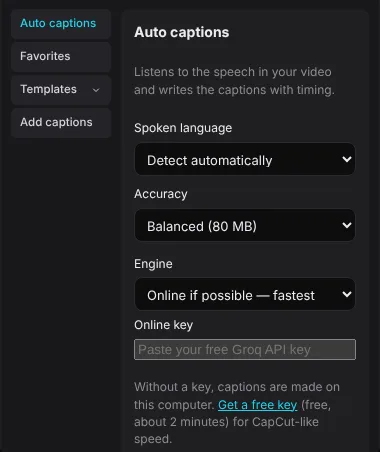
How to make Urdu captions
- Install Cutkaar and open it. Click Create project.
- Import your video with Import, or drag the file into the window. Click it to add it to the timeline.
- Open Captions → Auto captions.
- Set Spoken language to Urdu (اردو). If the video mixes languages, Detect automatically also works.
- Click Generate captions. Cutkaar skips the silent parts and only listens where someone speaks.
- Click any caption on the timeline to fix a word. Pick a style from Templates to change the font, colours and the highlighted word.
- Export with Export. The captions are part of the video. You can also save them as an SRT, VTT or TXT file for YouTube.
Get Cutkaar freeWindows 10 and 11 · version 3.9.3 · updates itself
Download for WindowsOnline or offline: which engine?
Online (fastest). With a free key from Groq, a 15-minute video is done in seconds. Your audio is sent to Groq to be transcribed.
On this computer (offline). Without a key, Cutkaar uses the speech model on your PC. It downloads once (31–181 MB), then works without internet. It is slower than online, and your audio never leaves your computer.
Good to know
- Urdu comes out in Urdu script (اردو), not Roman Urdu. You can type Roman Urdu into any caption by hand.
- Clear speech and little background music give the best results.
- Other languages: Hindi, English, Punjabi, Arabic, Pashto, Sindhi and more.